
Managing RunAPI API Assets with All API Hub
Use All API Hub with RunAPI to check balances, compare model pricing, manage API keys, and export credentials to the AI tools you already use.
RunAPI provides stable API access to many AI models. If you use multiple RunAPI accounts, work across several AI API platforms, or often configure RunAPI in different clients, All API Hub can keep those accounts and credentials in one local management entry point.
After adding a RunAPI account, you can view balances, manage API keys, check model pricing, and export credentials to Cherry Studio, CC Switch, Kilo Code, CLIProxyAPI, Claude Code Router, or your own self-hosted backend.

1. What All API Hub Does
All API Hub (open source on GitHub) is a browser extension for AI API users who need to manage multiple accounts, sites, and client configurations. For RunAPI users, it brings RunAPI account status, API keys, model pricing, and export actions into one workflow.
When used with RunAPI, it helps with:
- Unified multi-account dashboard: view RunAPI together with other AI API accounts.
- Cross-account price comparison: compare RunAPI model prices with other added accounts.
- Centralized API key management: view, create, edit, delete, and copy RunAPI API keys.
- Credential reuse: export managed
Base URL + API Keycredentials to clients, CLI tools, or self-hosted channels. - Multi-device continuity: move common configuration with import/export or WebDAV sync.
RunAPI provides the model API, and All API Hub helps organize the account, key, pricing, and downstream tool configuration around it.
2. Install All API Hub
For automatic updates and the most stable experience, install from the official store for your browser when possible.
Desktop Browsers
- Chrome: Chrome Web Store
- Edge: Microsoft Edge Add-ons
- Firefox: Firefox Add-ons
Other Environments
- QQ / 360 / Brave / Vivaldi / Opera, etc.: Brave, Vivaldi, and Opera can usually try Chrome Web Store first; QQ Browser, 360 Browser, Cheetah Browser, and similar browsers can use manual Chromium loading when no usable store path is available. See the Other Browser Installation Guide.
- Safari on Mac: see the Safari installation guide.
- Mobile browsers: see the mobile browser FAQ.
- Fallback option: if your browser cannot use a store build or Chrome Web Store compatible build, and the guide above does not work, download the Stable package from GitHub Releases. Manually installed builds do not update automatically.
3. Add a RunAPI Account
All API Hub can auto-recognize RunAPI accounts. Log in to RunAPI in your browser first, then let the extension read the current site and save the account.
3.1 Auto-Recognize and Add
Log in to RunAPI in your browser.
Click the All API Hub extension icon in the top-right corner of the browser.
Click Add Account, then use the current site address or manually enter the RunAPI address.
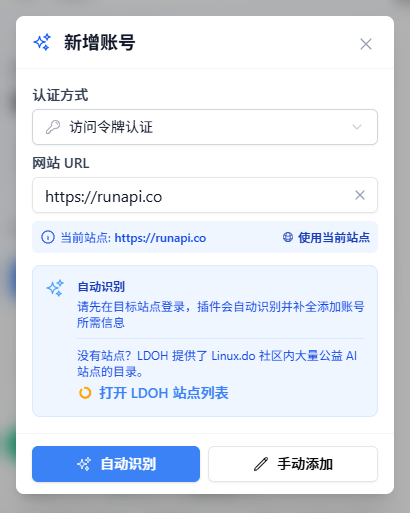
Click Auto-Recognize.
Confirm the account information, then click Save Account.
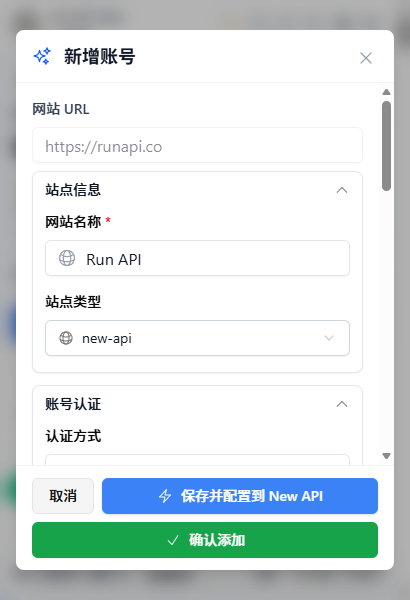
Tips
After the account is saved, the extension uses the imported account token to read balance, API key, and model pricing information.
3.2 Manage RunAPI API Keys
After adding the account, open Key Management to manage RunAPI API keys:
- View existing API keys under the account.
- Create a new key, or edit and delete existing keys.
- Copy frequently used keys, or save them to API Credential Profiles for reuse.
- Export credentials from the key list or credential profile when you need to configure another tool.
Use Key Management for day-to-day RunAPI key organization. Use export actions when you want to reuse the same key in a client, CLI tool, or self-hosted backend.
4. Common RunAPI Workflows
4.1 View Balance and Account Status
The All API Hub dashboard shows RunAPI alongside your other AI API accounts. Balance, status, and refresh results are shown in one place, which is useful when you manage multiple accounts.
4.2 Compare Model Pricing
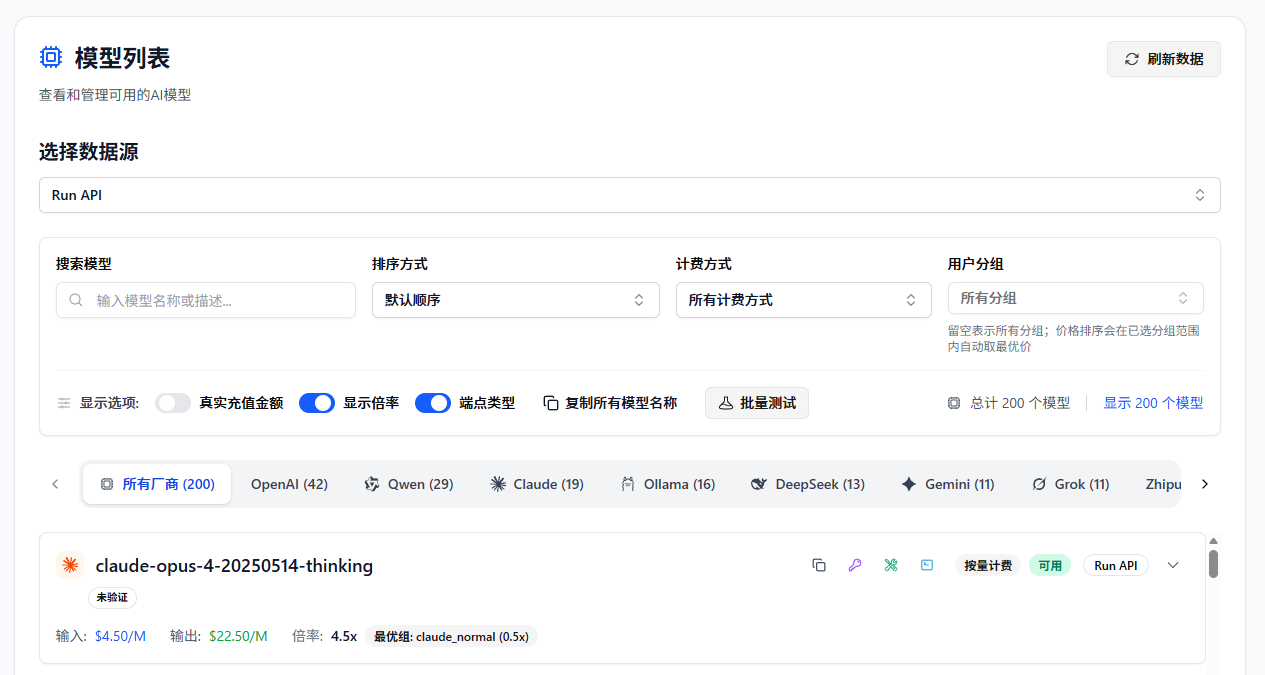
Open Model Pricing and select the RunAPI account as the data source. You can:
- View the model list returned by RunAPI.
- Search for a model and test whether it is available.
- Check input and output pricing for each model.
- Compare RunAPI pricing with models from other added accounts.
4.3 Export to AI Clients
To use RunAPI in another tool:
- Find your RunAPI key in Key Management.
- Choose an export action.
- Select the target tool, such as Cherry Studio, CC Switch, Kilo Code, CLIProxyAPI, Claude Code Router, or a configured self-hosted site.
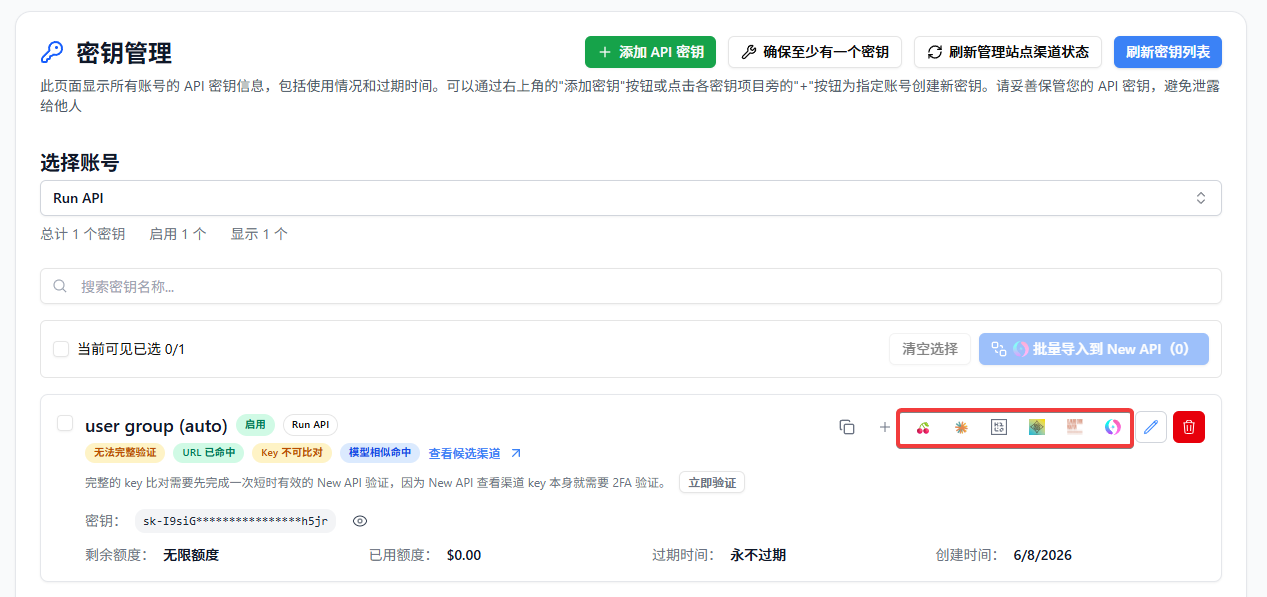
You can also:
- Copy
Base URL + API Keyfor manual configuration. - Verify whether the API is available, including CLI compatibility checks.
- View the model list available through the credential.
- Export the same credential to multiple clients.
- Import the credential into a configured self-hosted site as a new channel.
- Move the credential with data import/export or WebDAV sync.
4.4 Import into a Self-Hosted Channel
If you maintain an AI distribution backend, you can use RunAPI as an upstream provider. Configure your backend under Basic Settings → Self-hosted Site Management, then return to Key Management and import the RunAPI key into the current self-hosted site. You can also select multiple keys and import them in bulk.
4.5 Back Up and Move Between Devices
All API Hub stores data in the current browser by default. If you work across several computers, use data import/export or WebDAV sync to move configuration. Data is synced to WebDAV only after you explicitly configure it.
5. All API Hub vs. API Clients
| Area | All API Hub (Management) | Cherry Studio / NextChat and Similar Clients |
|---|---|---|
| Core role | Manage RunAPI and other AI API accounts, balances, keys, pricing, and channels | Send chats, run inference, and manage prompts or agent workflows |
| Main actions | Dashboard, key management, price comparison, credential export, channel import | Chat, file analysis, and agent workflows |
| Relationship | Organizes source configuration such as keys, Base URL, pricing, and account status | Uses the managed credentials to call models |
Recommended workflow: manage RunAPI accounts, keys, pricing, and exports in All API Hub, then use your preferred client to send requests.
6. FAQ
Q: Does All API Hub upload my API key?
A: By default, account and key data stays in your local browser. It is synced only if you explicitly enable WebDAV sync and configure your own WebDAV storage.
Q: Who is this best suited for?
A: It is useful if you have multiple RunAPI accounts, also use other AI API platforms, or often configure RunAPI in several clients and devices. You can still start with one RunAPI account and use balance checks, key management, and pricing comparison.
Q: Can I use All API Hub without a self-hosted backend?
A: Yes. After adding a RunAPI account, you can view balances, manage keys, compare prices, and export to clients. Self-hosted site management is only needed if you maintain an AI distribution backend.
Q: Will exported clients continue to work independently?
A: Yes. All API Hub only helps generate or fill configuration. Actual model calls are still handled by the target client.
Q: What is the relationship between All API Hub and the RunAPI console?
A: They work together. The RunAPI console remains the source for account, recharge, and official service operations. All API Hub is better suited for day-to-day account status, API key, pricing, and client configuration management.