
API Credential Library
Suitable for scenarios where you only have
Base URL + API Keywithout a site account. Save common API keys in one place for quick copying, API verification, model lookup, and balance/usage checks without first creating a full site account.
Suitable Scenarios
- You only have the
Base URLandAPI Keyprovided by a third-party platform, but no corresponding site console account. - You want to centrally store frequently used interface configurations to avoid repeatedly copying them between multiple clients or CLI tools.
- You have several keys and want to group them by purpose, such as work, testing, or backup, so they are easier to find later.
- You need to verify if a key is valid and compatible with the CLI before deciding to import it into downstream tools.
- You want to use the same interface configuration directly for model viewing, interface verification, or export flows.
These credentials are independent local profiles stored by the extension. They are not site accounts or the provider's API key resources. Deleting a local profile does not revoke the real key at the provider; revoke it in the provider console when you need to disable it.
API keys are sensitive
The complete API key is stored in the extension's local storage. Masking in the list only protects its on-screen display; viewing, editing, copying, verification, backups, and some exports still use the complete key. Never post a key or exported content in public chats, issues, or repositories.
Feature Overview
- Credential Library Management: Store name,
Base URL, API key, tags, and notes without relying on a site account. - Search and Filter: Supports filtering by name,
Base URL, tags, notes, and API type. - Health and Usage Overview: View balance, today's usage, today's requests, available models, last refresh time, and health status when the endpoint provides that data.
- Interface Verification: Supports verifying API availability and separately testing CLI compatibility.
- Model Integration: Directly open the current credentials in the model list to view the model catalog and verification results.
- Quick Export: Prioritizes a direct action for the currently configured self-hosted site. Other targets are grouped as chat clients, coding agents, and gateways and routing tools: Cherry Studio, Kelivo, CC Switch, Kilo Code / Roo Code, Cursor++, and Claude Code Router.
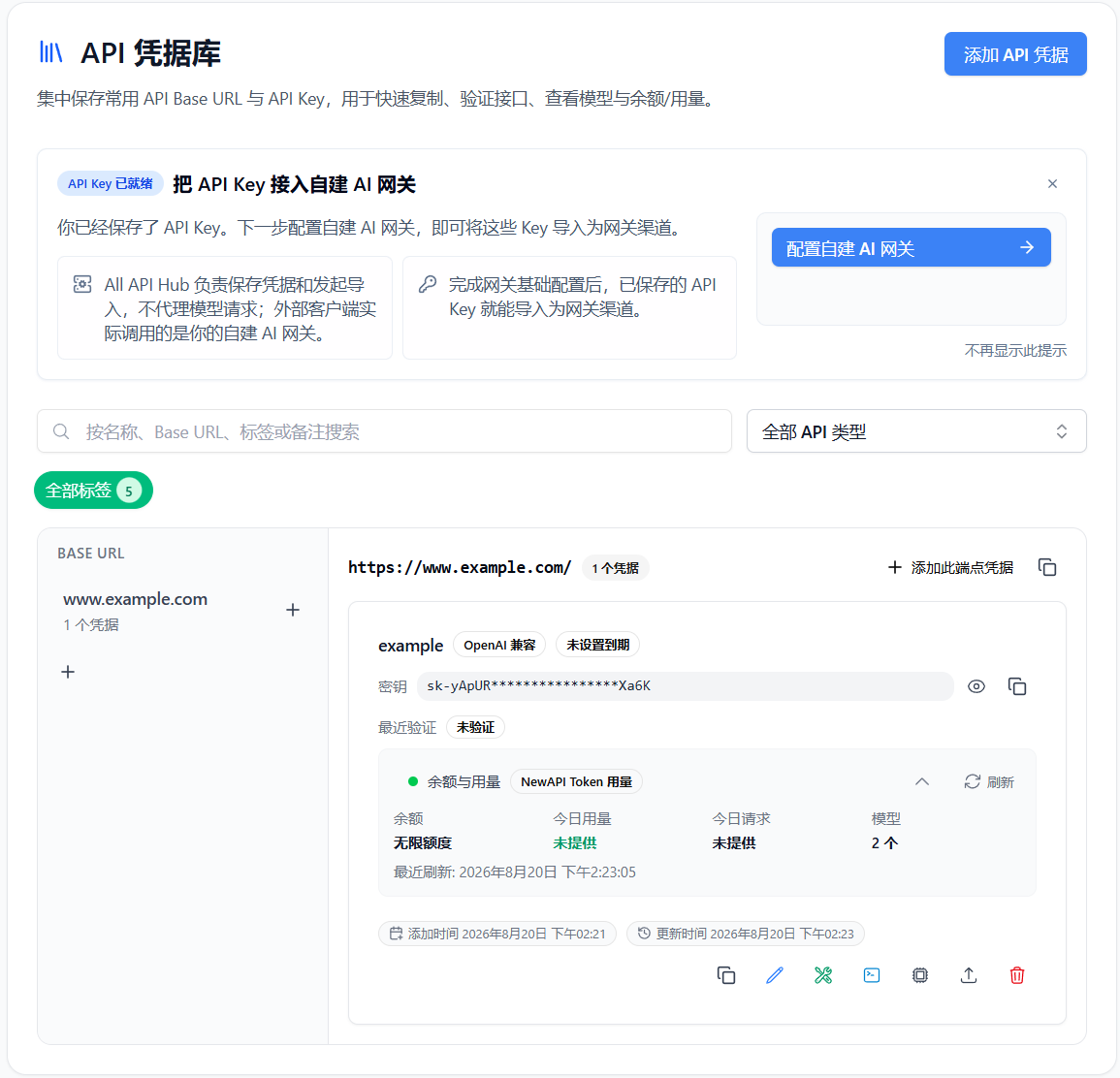
Access Method
- Open the plugin settings page.
- Navigate to
API Credential Libraryin the left-hand menu. - Click
Add API Credentialin the upper right corner.
The API Key entry in the extension popup also provides quick access to credentials. If you have already obtained a key for an upstream site in Key Management, you can verify or organize it there before saving it to the API Credential Library for easier later use.
Looking for High-Quality API Interfaces?
If you need stable and CLI-friendly API interfaces to fill your credential library, try our partners:
- Qiniu Cloud AI: An enterprise MaaS platform with one-stop access to 150+ mainstream global models. Enterprise users can claim 12 million free tokens.
- FennoAI: A stable and efficient Codex relay provider compatible with OpenAI and Anthropic protocols. It supports popular coding tools and enterprise workloads of up to 100 billion tokens per day. All API Hub users can get $50 in Coding Plan credits for $1.99, and referral purchases earn up to 20% commission. Setup guide
- PackyCode: Enter the
all-api-hubpromo code during recharge to get 10% off. Setup guide - Xingchen AI: 1:1 top-up ratio, invoicing support, and Claude pricing as low as 40% of the standard price. Setup guide
- XuanShu API: A next-generation AI model routing gateway for enterprises, technical teams, and individual developers, providing enterprise-grade one-stop API access to leading global models including Claude, GPT, and Grok. Model pricing ranges from 10% to 60% of standard rates. Register through this link to receive extra top-up bonuses, with more for your first top-up. Business customers can pay by corporate bank transfer and request invoices. Setup guide
- AICodeMirror: Official high-stability relay services for Claude Code / Codex / Gemini CLI. Register through this link to get 20% off your first top-up, and enterprise customers can get up to 25% off.
- Suixiang AI Relay: API relay services for Claude, Codex, Gemini, and more, with pay-as-you-go billing, daily check-in test credits, redundant routes, and automatic failover. Setup guide
- APIMart: A low-cost API platform for AI image & video generation — GPT-Image-2 from $0.006/image, 160+ images per dollar. One async API covers both image and video: submit a task, get an ID, fetch results via polling or callback. Batch tens of thousands of images without timeouts, switch models without changing code. Pay-as-you-go with no monthly fee.
- Dola Seed on BytePlus ModelArk: Register through BytePlus ModelArk to get 500,000 free inference tokens per model.
How to Add Credentials
Basic Fields
| Field | Description |
|---|---|
| Name | For distinguishing different purposes, e.g., "Company Relay Station Read-only Key" |
| Base URL | The base address of the interface; it will be automatically normalized upon saving. |
| Key | The corresponding API Key. The input is masked by default and can be revealed temporarily. |
| Tags | Optional; shares the global tag system with accounts and bookmarks. |
| Notes | Can record information such as source, purpose, model limitations, etc. |
| Expiration date | Optional. This is only a reminder date you enter; it does not mean the provider has confirmed that the key expires then. |
API Type
Currently supports classification and verification by API type. Common types include:
OpenAI CompatibleOpenAIAnthropicGoogle
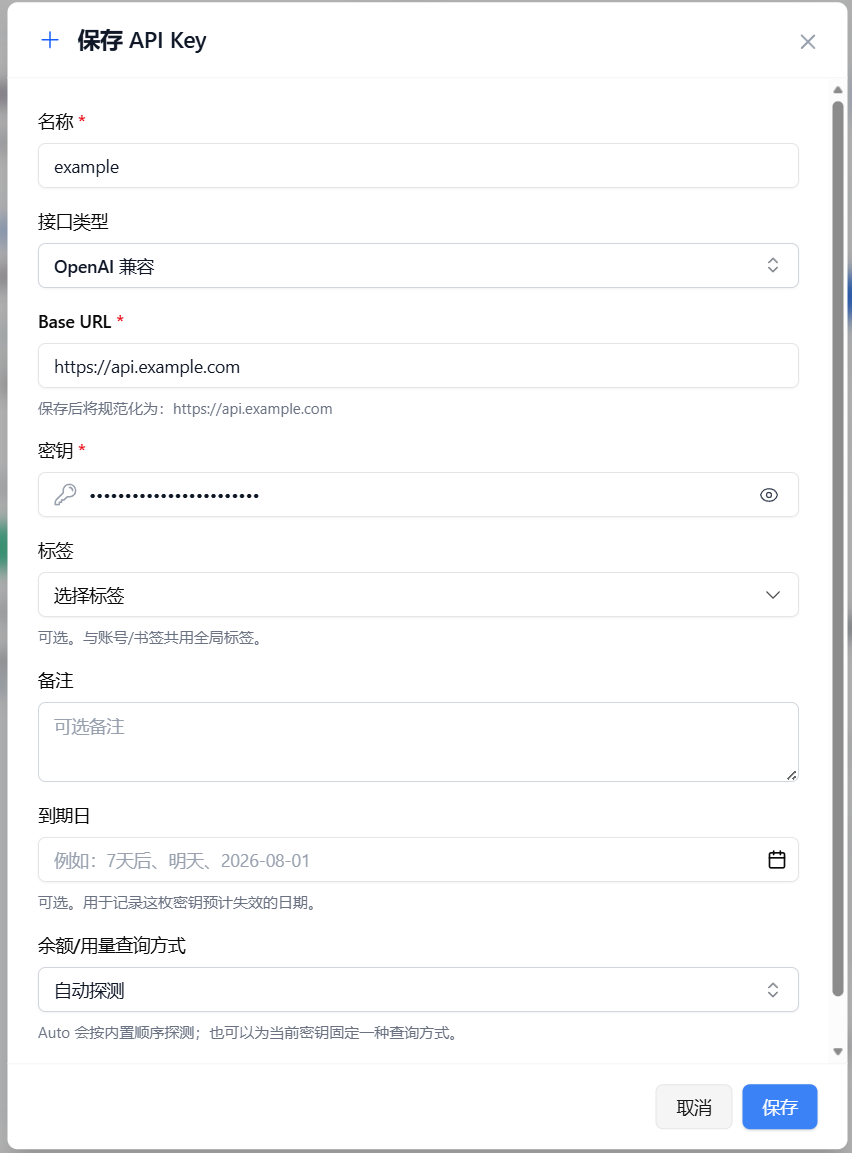
If you are unsure which type to choose, follow the provider's documentation. When it gives no specific guidance, try OpenAI Compatible first. If you temporarily use another API type for verification, the interface will clearly indicate that this is only a temporary override and will not change the saved credential type.
Balance and Usage Queries
Each credential card can display a balance and usage overview, with common metrics including:
- Balance
- Today's Usage
- Today's Requests
- Today's Tokens
- Available Models
- Last Refresh Time
- Health Status and Last Error
This data comes from query endpoints supplied by the provider. Whether anything can be displayed, and which fields are available, depends on the provider. Missing data does not necessarily mean the key is invalid; try another query method.
Query Method
You can choose the balance/usage query method for each credential:
- Auto-detect: Attempts compatible methods in a built-in order.
- NewAPI Token: Suitable for querying token usage compatible with New API.
- OpenAI Billing: Suitable for standard OpenAI Billing queries.
- Sub2API: Suitable for Sub2API-style interfaces.
- Custom Read-only Endpoint: Suitable for sites with custom read-only query endpoints.
Disabled: Does not query balance and usage, only retains the credential itself.
Auto-detect tries several query methods in order and uses the first one that works. It is not failover or load balancing for API requests, and it does not switch keys or model requests for you.
Custom Read-only Query
If none of the built-in methods return data and you know the site's own query endpoint, select Custom Read-only Endpoint:
- Select
Custom Read-only Endpoint. - Enter the query address, such as the usage endpoint from the provider documentation.
- Follow the form prompts to specify where balance, usage, and other values appear in the response. The extension parses and displays them for you.
Stability and Rate Limiting
To protect your account from being judged as abnormal by upstream sites, All API Hub has a built-in Smart Request Limiter:
- Concurrency Control: Defaults to limiting the number of concurrent requests to a single site to 2.
- Rate Control: Limits the request rate to a single site to approximately 18 times per minute (supports small bursts).
- Auto-Queueing: When refreshing multiple accounts or performing batch verification, requests exceeding the limit will automatically enter a queue to avoid triggering 429 Too Many Requests errors.
Note
This limit primarily applies to refresh and verification actions in the extension background. It does not affect direct API calls made through other tools such as Cherry Studio.
Common Operations
1. Verify Interface
Click Verify Interface on the card to confirm:
- If the current key can still be used.
- If the model list can be fetched.
- If the response conforms to the expected API type.
This is useful when changing keys, switching networks, or troubleshooting "client cannot connect, but the site seems alive."
Under Test mode, choose Streaming (the default) or Non-streaming. Generation tests use the selected mode, and their results and newly saved history show that mode. Fetching the model list is unaffected. If the endpoint rejects a request, you can switch modes and test again; tests do not switch automatically.
A verification result describes only that probe. It does not mean the key is permanently valid or invalid; verify again after changing networks or keys, or whenever you notice a problem.
2. Verify CLI Compatibility
Click Verify CLI Compatibility to separately test:
- If the current interface is suitable for CLI tools.
- If the model ID can be used in CLI scenarios.
- If there are compatibility differences such as "web can call, but CLI cannot."
This check does not launch Claude Code, Codex, Gemini CLI, or another program. It simulates the protocols and tool-calling patterns commonly used by those CLIs to help you assess compatibility in advance.
Under Test mode, choose Streaming (the default) or Non-streaming. Each CLI keeps its corresponding API type for the tool-calling probe. Results show the selected mode, and failures do not trigger an automatic mode switch.
3. Open in Model List
After clicking Open in Model List, the model list page uses the current API credential as its data source. This lets you view the model catalog and verify model availability without first creating a site account.
This only uses the credential as a data source for the model catalog. It is not full provider model management and does not guarantee that every listed model supports every capability.
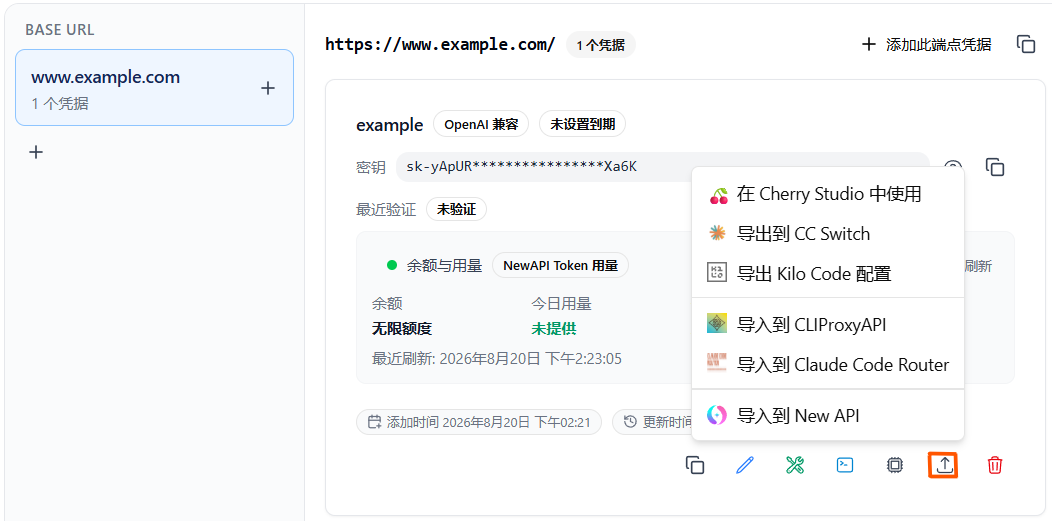
4. Quick Export
Supports direct export from a single credential to:
- Self-hosted site: The actions area shows the currently configured self-hosted site icon. Selecting it opens a prefilled new-channel flow; nothing is written until you review and submit it. Even when a matching channel is detected, the extension only warns about the duplicate risk and does not update or overwrite the existing channel. Fields and failure results vary by managed site, and a failed write is not rolled back automatically.
- Chat clients: Cherry Studio, Kelivo
- Coding agents: CC Switch, Kilo Code / Roo Code, Cursor++
- Gateways and routing tools: Claude Code Router
Except for the direct self-hosted-site action, all targets are grouped under the Export menu. Different tools receive credentials in different ways: some use deep links, some use the clipboard or generated configuration, and Claude Code Router calls remote management APIs. These are not one uniform “secure configuration export.”
Exports may contain the complete API key. Some deep links or import codes use Base64, but Base64 is encoding rather than encryption, so protect that content.
Each tool expects different fields and import steps. Follow the export dialog and see Supported Export Tools and Integration Targets and Quick Export Site Configuration for Kilo Code, Cursor++, Kelivo, and other targets.
If you simply want to store several keys in one place, verify them, and then export them, the API Credential Library is more direct and does not require a full site account.
Usage Recommendations
- Name with Purpose: For example, "OpenAI Read-only Test Key" or "Company Relay Station Claude Specific Key" for clearer filtering later.
- Use Tags as Groups: For example,
Work,Personal,Production,Test,Temporary. - Verify Before Export: This prevents batch importing invalid keys into multiple clients.
- Record Limitations in Notes: For example, "Only supports Anthropic," "Balance display is inaccurate," "Internal network only."
- Remember what deletion means: Deleting a local profile does not revoke the real key at the provider.
Backup and Security Notes
The API Credential Library is included in normal backup, restore, and selective WebDAV synchronization. A full backup may contain complete API keys and Bearer tokens used by custom queries. Protect backup files like passwords.
WebDAV encryption must be explicitly enabled, configured, and protected with a password. It does not mean the extension's local storage, ordinary JSON backups, clipboard, or exports to external tools are encrypted by default.
Copying an API key places the complete secret on the system clipboard. When exporting to another tool, the key may appear in a deep link, clipboard content, generated configuration, or a remote management API. Never post this content in public chats, issues, or repositories.
Frequently Asked Questions
| Question | Description |
|---|---|
| I only saved the credential, why is there no balance data? | The current query method may not be compatible with the site, or the site does not provide a corresponding read-only interface. Missing balance data does not necessarily mean the key is invalid; try switching the query method or using a custom read-only query. |
| Why does the model-related verification require a model ID? | Some CLI compatibility checks and model call verifications require a specific model. The interface will try to automatically suggest a model, or you can manually enter one. |
| Can it replace account management? | Not entirely. The API Credential Library is better for saving and using standalone API keys for API verification, model lookup, and export; account management is still responsible for site identification, balance refresh, check-ins, usage synchronization, and other account-level capabilities. |
| Will the API Credential Library be included in backups? | Yes. It is part of the shared data and can be migrated along with data import/export and selective synchronization via WebDAV. Importing profile data may show Merge, Replace, or Skip options. |
| Does successful verification guarantee that every tool will work? | No. Verification represents one API probe. A target tool may use a different protocol, model, or configuration, so test again in that tool. |
| Does deleting a profile revoke the remote API key? | No. Deletion only removes the local record; revoke the remote key separately in the provider console. |